wx.showActionSheet(OBJECT)
显示操作菜单,形式为底部弹出的选择按钮。
OBJECT参数说明(表8-56): 表8-56
| 参数 | 类型 | 必填 | 说明 |
|---|---|---|---|
| itemList | String Array | 是 | 按钮的文字数组,数组长度最大为6个 |
| itemColor | HexColor | 否 | 按钮的文字颜色,默认为"#000000" |
| success | Function | 否 | 接口调用成功的回调函数,详见返回参数说明 |
| fail | Function | 否 | 接口调用失败的回调函数 |
| complete | Function | 否 | 接口调用结束的回调函数(调用成功、失败都会执行) |
success返回参数说明(表8-57): 表8-57
| 参数 | 类型 | 说明 |
|---|---|---|
| tapIndex | Number | 用户点击的按钮,从上到下的顺序,从0开始 |
示例代码:
<button type="default" bindtap="actionSheetTap">点击弹出ActionSheet</button>
actionSheetTap: function () {
    wx.showActionSheet({
      itemList: ['item1', 'item2', 'item3', 'item4'],
      //itemColor:"#223344",
      success: function (e) {
        var item=""
        if(e.tapIndex!=undefined){                 //获取点击的是第几项
          item="点击了第"+String(e.tapIndex+1)+"项"
        }else{                                    //如果点击了取消按钮或菜单以外区域,返回“取消选择”
          item="取消选择"
        }
        wx.showToast({                 //弹出提示框
          title: item
        })
      }
    })
  },
运行结果(图8-8):
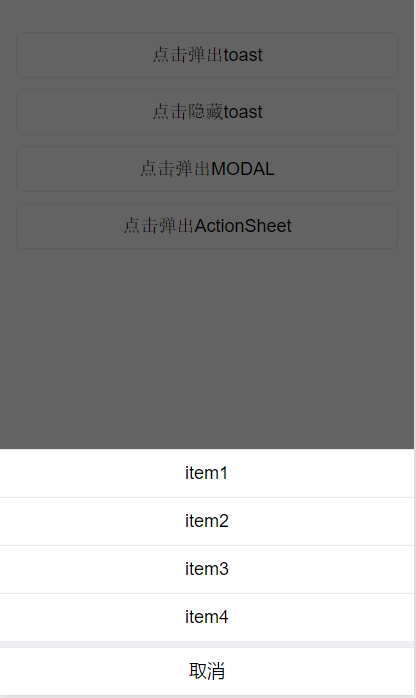 图8-8 ActionSheet示意图